

Finding discount coupons with ChatGPT is possible thanks to one of its lesser-known features: Deep Research. Instead of simply asking ChatGPT for coupons, you need to activate this function so it can search the internet, cross-check information, and verify results before offering them to you.
This approach saves you from browsing multiple coupon sites and lets you get potential codes directly from the AI. We'll show you how to do it on the desktop version, but the process works on any version, including the mobile app.
Find Original Home Decor sparking conversation at Grand Goldman Shop.

Why Use ChatGPT for Coupon Hunting?
ChatGPT's Deep Research mode goes beyond a simple web search. It analyzes and validates the information it finds, which means you're more likely to get working coupons. This is especially useful when you're shopping online and want to avoid missing out on savings.

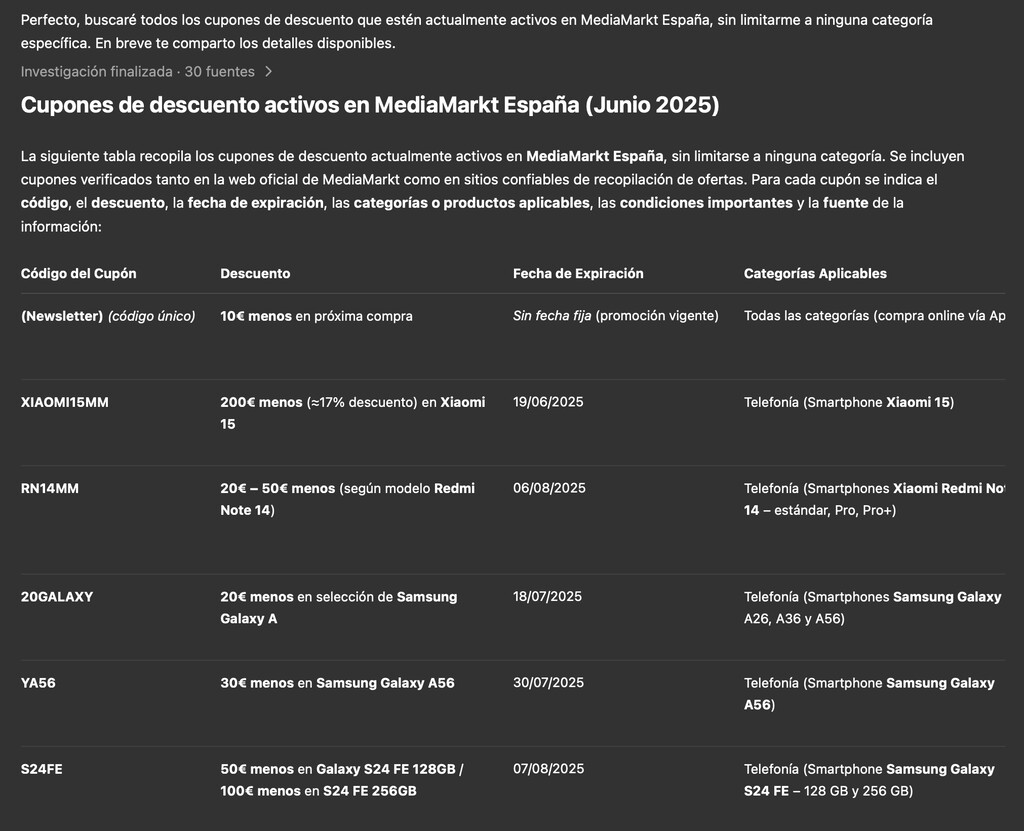
However, keep in mind that coupons don't always work. Even if ChatGPT finds codes for the current month, some may have expired, be product-specific, or overlap with other offers. It's also possible that the store you're interested in hasn't released any coupons recently.
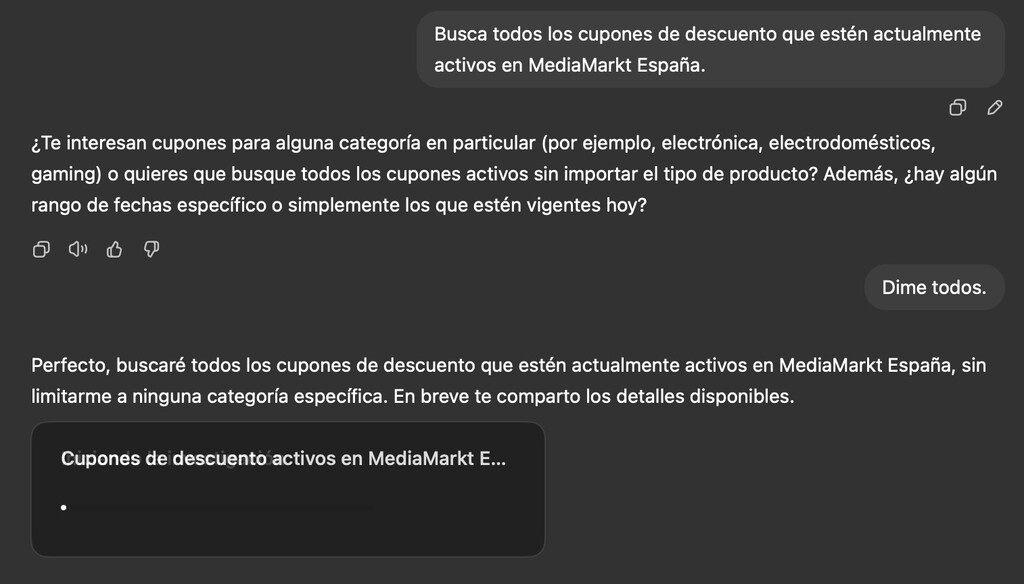
Despite these limitations, it's a tool worth considering. In our tests, it helped find some valid codes. Just be prepared for the search process to take several minutes due to the nature of Deep Research.
Step-by-Step: Activating Deep Research
First, open ChatGPT and start a new chat. Look for the option to enable Deep Research—it might be under a menu or a toggle. Once activated, ChatGPT will not only search the web but also cross-reference and verify the information before responding.
This is crucial because it reduces the chance of getting outdated or invalid coupons. The AI will take its time to gather and analyze data, so patience is key.
What Makes Deep Research Different?
Unlike a standard query, Deep Research digs deeper. It compiles information from multiple sources and checks for consistency. This means you're more likely to receive a curated list of coupons that have a higher chance of working.
It's like having a personal assistant who scours the web for you and filters out the noise.
How to Ask for Coupons Effectively
Once Deep Research is on, you can ask ChatGPT to find coupons for a specific store. Be clear and specific: mention the store name and any product details if relevant. For example, “Find discount coupons for Nike running shoes” or “Are there any active promo codes for Amazon electronics?”
The AI will then search and analyze results, eventually providing you with a list of potential codes. Remember that the response may take a few minutes.
Tips for Better Results
- Be specific: Include the store name and product category to narrow down results.
- Check the date: Ask for coupons valid for the current month to increase chances of validity.
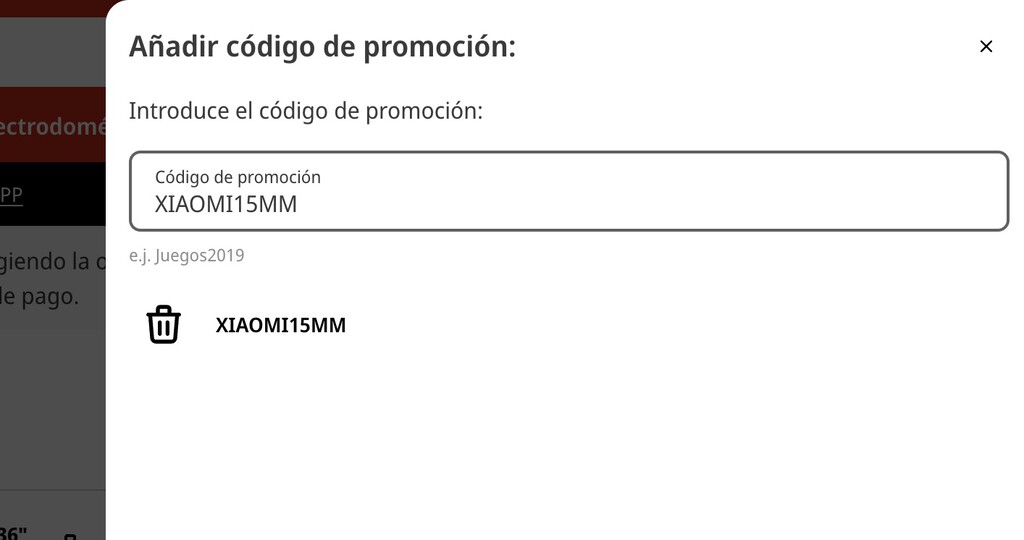
- Verify before use: Always test coupons at checkout; some may be expired or restricted.
- Try multiple stores: If one store doesn't have coupons, ask for alternatives.
- Use the mobile app: If you're on the go, the process works the same on your phone.
Limitations and Considerations
While ChatGPT can find coupons, it's not a magic bullet. Coupons may be expired, product-specific, or incompatible with other offers. Additionally, some stores may not have any active coupons at the time of your search. The background to this story is set out in ChatGPT Computer History: How It Tracks Your Desktop Activity. A related thread runs through Lesser-Known European Islands: Hidden Gems for Your Next Escape. Earlier coverage in Frank Gehry Exhibition Celebrates His Lesser Known Animal Art shows how the argument developed.
It's also important to note that Deep Research takes longer than a regular query because it's doing more work. So, don't expect instant results. A closer look at the same subject appears in Lidl Instant Camera Sells Out Online, Returns to Stores in Two Days. Anyone following the wider picture can start with ChatGPT Free Plan Goes Unlimited: The Asterisk That Matters. The same theme surfaces in 8 Best Diamond Watch Online Stores (Reviews), which takes a different angle.
Despite these limitations, ChatGPT can be a valuable tool in your coupon-hunting arsenal, saving you time and potentially money. Context on how this played out before sits in How to Spot Scams and Verify What Is Real in a Distrustful World. A companion piece, Garmin Watch Deals at MediaMarkt: Save with Discount Coupon, approaches the same subject from another angle.
Comparison: Traditional Coupon Sites vs. ChatGPT
| Feature | Traditional Coupon Sites | ChatGPT with Deep Research |
|---|---|---|
| Search method | Manual browsing | AI-powered web search and analysis |
| Time required | Varies, often minutes per site | Several minutes per query |
| Verification | User must check validity | AI cross-checks information |
| Coverage | Limited to site's database | Broad web search |
| Ease of use | Requires multiple tabs | Single chat interface |
FAQ
Can ChatGPT find working coupons for any store?
Not always. ChatGPT searches the web and analyzes results, but coupons may be expired, product-specific, or unavailable. It's best for stores with recent promotions.
How long does it take to get coupons from ChatGPT?
The process can take several minutes because Deep Research thoroughly searches and verifies information before responding.
Is Deep Research available on the mobile app?
Yes, Deep Research works on both desktop and mobile versions of ChatGPT, though the interface may vary slightly.
What if the coupons ChatGPT finds don't work?
Some coupons may be expired or restricted. Always test codes at checkout, and try asking for alternative stores or newer coupons.
In conclusion, ChatGPT's Deep Research feature offers a convenient way to find discount coupons without visiting multiple sites. While not foolproof, it can save time and help you uncover valid offers. Give it a try next time you shop online and see how much you can save.
Browse the Shop
 Acacia frida deluxe solid wood bed frame |
Bedroom bench |
Bed chest drawers |
Lingerie dresser |
Frame base |
Mirror with jewelry storage |
30 Bathroom Vanity |
Memory foam queen mattress |
Mattresses for back pain |
Nightstand set of 2 |
Grand Goldman Shop |
Civil Lawyer
Deutschland Trikot WM 2026







