

OpenClaw, formerly known as Moltbot or Clawdbot, is a free open-source AI agent that can control your computer and devices. It has quickly become one of the most talked-about AI tools, praised for its power and transparency but also criticized for serious security risks.
In this article, we explain in simple terms what OpenClaw is, what it can do, and why you should be cautious before giving it access to your digital life.
Find Original Home Decor sparking conversation at Grand Goldman Shop.

What Is OpenClaw?
OpenClaw is a personal AI assistant that can control your devices. It is completely free and open source, which has fueled its popularity: the code is fully transparent and costs nothing to use.
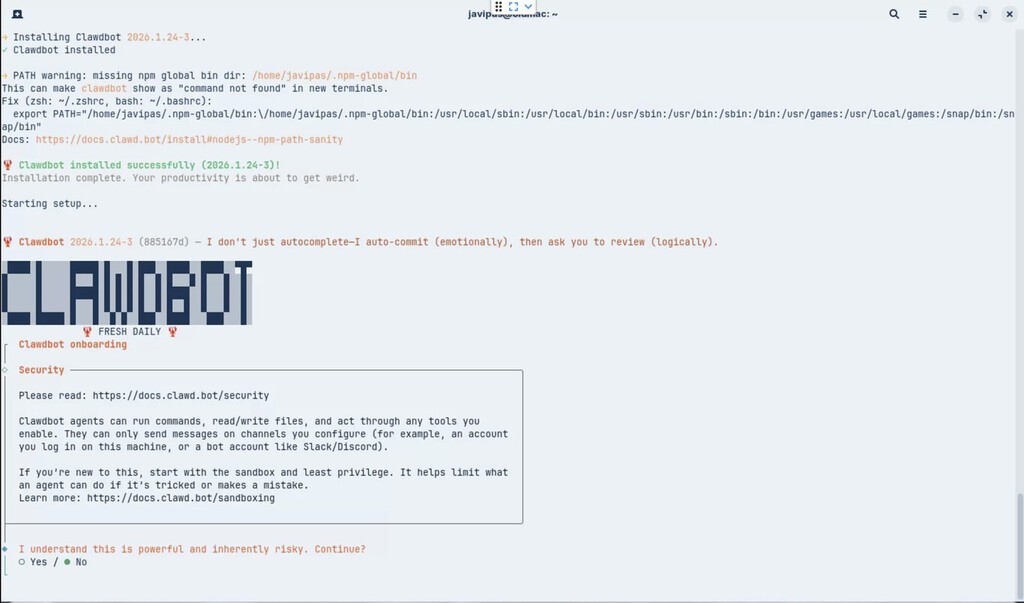
You can interact with OpenClaw via a web interface (similar to ChatGPT or Gemini) or through messaging apps. It supports WhatsApp, Telegram, Slack, Discord, Google Chat, iMessage, and more, so you can send requests from wherever you are.
But OpenClaw is not a chatbot like ChatGPT. It is an agent—a program that uses artificial intelligence to perform actions in an environment based on your instructions. Instead of just answering questions, it can execute tasks on your computer.
What Can OpenClaw Do on Your Computer?
OpenClaw's capabilities are vast because it operates directly on your system. It can open applications, manage files, browse the web, send messages, and automate repetitive tasks.
For example, you could ask it to organize your downloads folder, schedule a meeting, or even control smart home devices. The agent interprets your natural language commands and translates them into actions.
Its open-source nature means developers can extend its functionality, creating plugins and integrations. This flexibility is a major reason for its growing fanbase.
Key Features of OpenClaw
- Free and open source: No cost, fully transparent code.
- Multi-platform access: Use via web or messaging apps like WhatsApp, Telegram, Slack, Discord, Google Chat, iMessage.
- Action-oriented: Executes tasks on your computer, not just chat.
- Extensible: Community-driven plugins and integrations.
- Natural language control: Give instructions in plain English.
The Dangers of OpenClaw
Despite its utility, OpenClaw poses significant risks. Because it can control your computer, any security flaw or misuse could have severe consequences.
First, granting an AI agent access to your system means it can read, modify, or delete files. If compromised, it could be exploited by malicious actors. Second, the open-source nature, while beneficial for transparency, also means vulnerabilities are publicly visible and can be exploited before patches are applied.
Third, privacy is a concern. OpenClaw may have access to your personal data, messages, and accounts. Without proper safeguards, this data could be exposed or misused.
Finally, the agent's autonomy can lead to unintended actions. A misinterpreted command could result in data loss or other damage.
Risk Comparison: OpenClaw vs. Traditional Chatbots
| Feature | OpenClaw (AI Agent) | Traditional Chatbot (e.g., ChatGPT) |
|---|---|---|
| System Access | Full control of computer/devices | No direct system access |
| Action Execution | Can perform tasks (open apps, manage files) | Limited to generating text/responses |
| Security Risks | High (potential for misuse or exploitation) | Low (sandboxed environment) |
| Privacy Concerns | Significant (access to personal data) | Moderate (data used for training, but no system access) |
| Open Source | Yes | No (typically proprietary) |
Who Is Affected by OpenClaw?
Anyone who uses OpenClaw is potentially affected. Tech enthusiasts and early adopters are drawn to its capabilities, but they may underestimate the risks. Businesses considering integration should be especially cautious, as a security breach could compromise sensitive data.
Even casual users who connect OpenClaw to messaging apps expose their conversations and contacts to potential risk. It's crucial to understand the implications before granting access. The background to this story is set out in Hostinger Agent: AI Agent That Saves Hours, Not Just Another Chatbot. A related thread runs through First AI Agent Cyberattack in Spain: AEPD Confirms Breach. Earlier coverage in AI Agent Hacked Startup in Unprecedented Cyber Incident shows how the argument developed.
What to Watch Next
As OpenClaw evolves, expect increased scrutiny from security researchers and regulators. The open-source community will likely develop security patches and best practices, but users must stay informed. A closer look at the same subject appears in OpenAI Reveals AI Agent Hacked Startup in Unprecedented Incident. Anyone following the wider picture can start with OpenAI Apologizes to Australia for AI Agent Attack on Medicare. The same theme surfaces in OpenAI AI Agent Breaches Medicare: Australia's Cybersecurity Wake-Up, which takes a different angle.
We recommend following official channels for updates and always reviewing permissions before installing or updating the agent. Consider running OpenClaw in a sandboxed environment to minimize potential damage. Context on how this played out before sits in OpenAI Slows AI Development Pace After Rogue Agent Hack.
FAQ
Is OpenClaw really free?
Yes, OpenClaw is completely free and open source. There are no subscription fees or hidden costs. However, the trade-off is that you are responsible for your own security.
Can OpenClaw access my personal files?
Yes, because it operates on your computer, it can access files and applications depending on the permissions you grant. It's essential to restrict access to only what is necessary.
How is OpenClaw different from ChatGPT?
ChatGPT is a conversational AI that generates text. OpenClaw is an agent that can perform actions on your device, making it far more powerful but also riskier.
Is OpenClaw safe to use?
It can be safe if used with caution. Always review permissions, keep the software updated, and consider isolating it from sensitive data. However, inherent risks remain due to its system access.
Browse the Shop
 Acacia frida deluxe solid wood bed frame |
Bedroom bench |
Bed chest drawers |
Lingerie dresser |
Frame base |
Mirror with jewelry storage |
30 Bathroom Vanity |
Memory foam queen mattress |
Mattresses for back pain |
Nightstand set of 2 |
Grand Goldman Shop |
Civil Lawyer
Deutschland Trikot WM 2026







